Frequently asked questions about the Pepita app
Pepita scans Pokémon cards on iPhone and Android, with free scans every day and European prices in euros for collectors in France. The 14 answers below explain price sources, card languages and limits. The app is available in English and French.
The app
Is Pepita free?
Yes. You can scan for free every day on iPhone and Android and check prices in euros.
Can I scan for free every day?
Yes. Free scans renew every day, so you can return to value new cards.
Is Pepita available on Android?
Yes: Pepita is available on Android and iPhone (from iOS 16.4). This site and its free tools work in any browser, on any device.
Do I need an account to scan a card?
Yes. The app asks you to sign in with Apple or Google before the first scan and does not open without it. There is no password to create and no form to fill in.
Is the app available in English?
Yes. The app is available in English and French. It follows your phone’s language on first launch, and you can switch it in Settings. The website and its free tools are available in English too.
Prices
Where do Pepita’s prices come from?
From Cardmarket, in euros, which is the European market, never a US price converted on the fly. The app never shows an amount in another currency.
Does Pepita tell a reverse holo from a normal card?
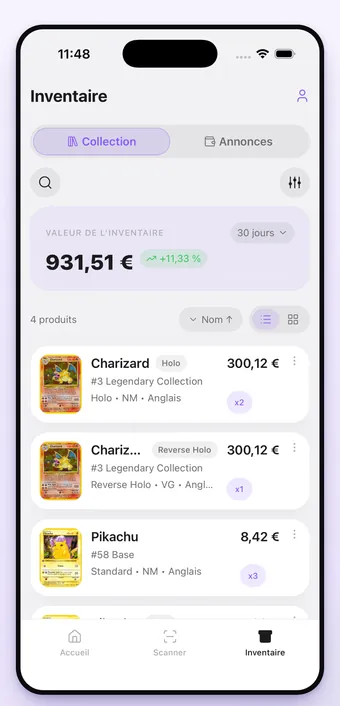
Yes, and it is the detail that moves the price most: the card page lets you pick the printing (standard, reverse holo, holo) and each printing carries its own price. The detected variant is a suggestion you can correct in one tap.
Does Pepita read Japanese cards?
Yes. The catalogue covers English, French, German, Spanish, Italian, Japanese and simplified Chinese. When a Japanese card has no price of its own, the app may show the price of the same printing in another language, and says so.
Does Pepita price PSA graded cards?
No, not today: the prices shown are for ungraded cards. The app can tell a slabbed card to frame the scan, but it puts no number on the grade.
Your data
Where is my collection stored?
On your phone, locally. There is no cloud sync: changing phone does not carry the collection over.
What happens to a scan photo?
It identifies the card. A resized copy without metadata is kept for up to 12 months to correct recognition and train our models, then deleted. It is also deleted with the account. See the privacy policy for details.
Does Pepita send notifications or price alerts?
Notifications can be managed in the app settings and phone settings.
Help and contact
How do I correct a scan that identified the wrong card?
From the scan’s card page: change the set, the number, the printing or the language, and the price is recomputed on the right card. If the right card stays out of reach, email support@pepitacards.com with the photo attached.
How do I contact the Pepita team?
At support@pepitacards.com, or from Settings → Contact support in the app. It is a real address, read by a human, not a form.
Point the camera, read the price
Frame a card, read its Cardmarket price in euros, keep it in your collection. Free scans every day on iPhone and Android. The app is available in English and French.
Read next
The app page sets out what Pepita does and what it does not do. Comparing several apps before you install? The comparison of Pokémon card scanner apps puts Pepita next to its competitors and says what each one does better. For anything about your data, the privacy policy and the support page answer in detail, and support@pepitacards.com stays open.