Inventory your Pokémon cards without an account
Describe each printing (set, number, language, finish, condition or grade) and link your photos or invoices. Download a CSV you can use straight away, without uploading your collection.
Build a clear record, card by card
Your table will appear here. It stays in this tab until you reload, so download the CSV before you leave.
Documentary basis: France Assureurs (the French insurers’ federation, page in French), consulted on 4 September 2026. Your own policy is the only reference for the documents your insurer asks for.
An inventory tells apart what you own
A list of names is not enough for a Pokémon collection. The set, collector number, language, finish and condition or grade identify the printing you actually hold.
The CSV brings these together with the quantity and your photo or proof references. You can then see which document is missing, without exposing your collection to an online service.
What the file does, and does not do
Each row is one precise identity. A raw card keeps its stated condition. A graded card keeps the grading company and the grade separately. Quotation marks and accents are escaped so the CSV opens cleanly in a spreadsheet.
France Assureurs lists invoices, certificates, photographs and other supporting documents among the ways to establish that stolen goods existed and what they were worth. Insurers elsewhere in Europe typically ask for similar evidence. This tool only helps you index your own documents. It does not store files, put a value on anything or promise any cover or payout.
Reread your policy and ask your insurer exactly what they expect. Update the file after every purchase, sale, change of condition or new grading, then keep a copy away from the device holding the photos.
What the result includes
The table and the CSV contain the name, set, number, language, finish, quantity, raw or graded status, condition or grade, proof and photo references, and the export date.
No price, condition, grade, authenticity or insurance decision is inferred. You supply every fact and can remove a row before exporting.
Complete your records
Swap typing for a scan
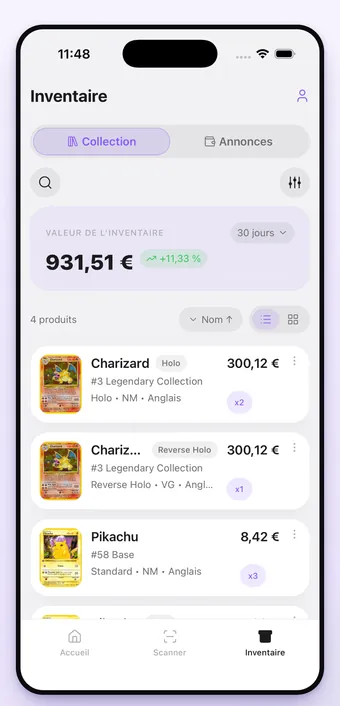
Pepita identifies the set, number, language and finish from one photo, then keeps each copy in your collection with its value in euros. The app is available in English and French.
Frequently asked questions
Does this inventory prove what my cards are worth?
No. It describes the cards and links your own supporting documents. A valuation, an invoice or a separate appraisal is still needed to document a value.
Is my data saved anywhere?
No. The rows stay only in the open tab. Download the CSV before you close or reload the page.
Why record language, finish and condition separately?
Two cards with the same name can be different printings. These fields stop you confusing a non-holo with a reverse holo, an English card with a Japanese one, or a raw card with a graded one.
Can I open the CSV in Excel or Google Sheets?
Yes. The file is UTF-8 with quoted cells, so accents, quotation marks and commas survive. Cells that start like a spreadsheet formula are neutralised so nothing runs when you open it.
Does the CSV guarantee an insurance payout?
No. Every policy and every claim is assessed by the insurer. Ask them which documents they expect and keep the originals outside this tool.